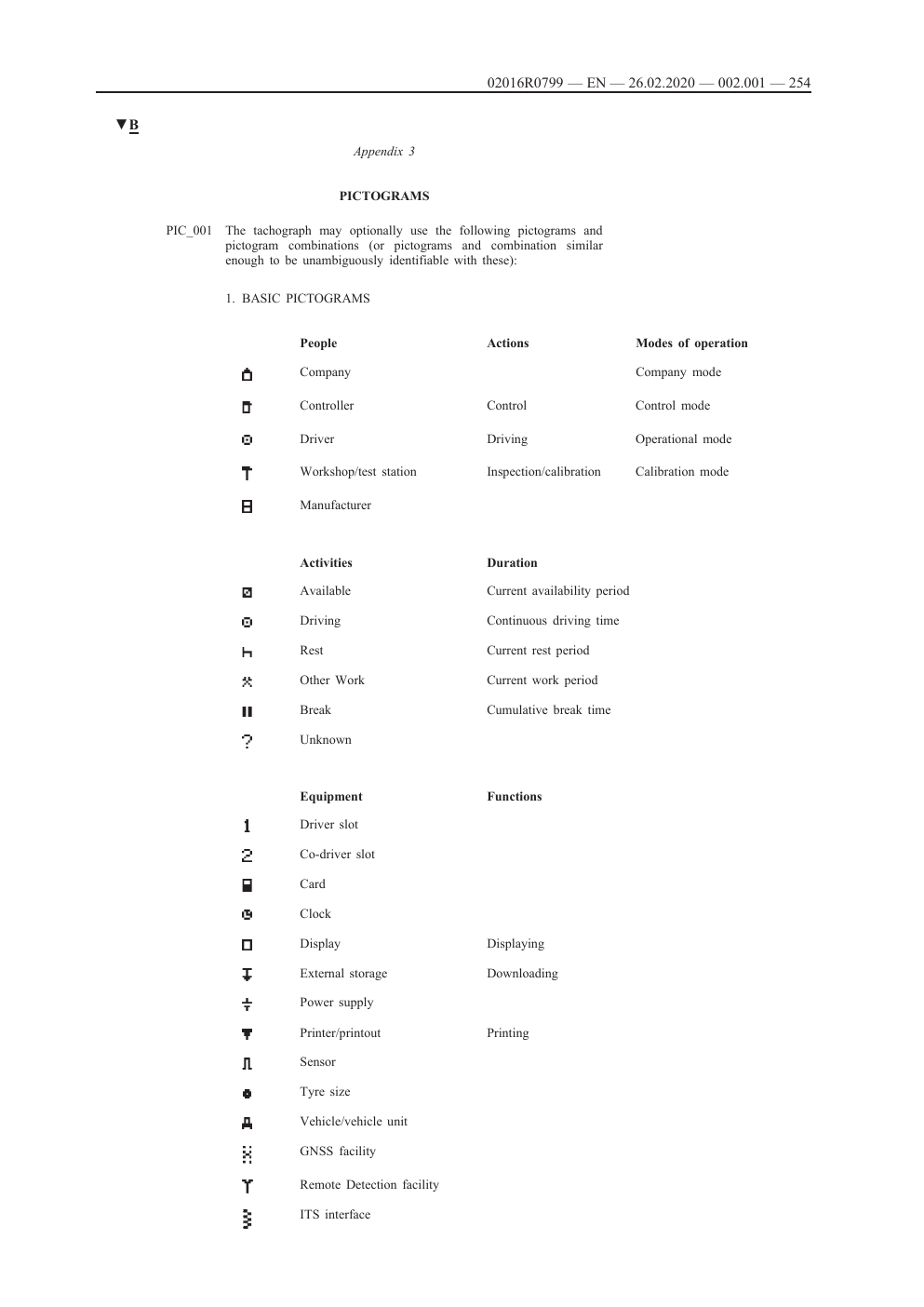
Recognise the mode, then check that it matches your activity
The main tachograph activity symbols identify driving, other work, availability and break or rest. Recognising the symbol is only the first step. The selected mode must match what you were actually doing.
Do not assume the unit has selected the right mode when the vehicle stops. Digital and smart tachographs can be configured to default to different modes. Check the display and use the mode button correctly.
Official Appendix 3 pictograms. Open the image for the full-size page. Source: Regulation (EU) 2016/799, Appendix 3, EUR-Lex. The official PDF page has been converted to PNG for web display.
The four activity modes
Mode
Use it for
Driver check
Driving
Driving time. Most tachographs record this automatically when the vehicle moves.
Make sure your own card is in the correct slot and ready before moving the vehicle.
Other work
Work other than in-scope driving, including work for the same or another employer.
Use it for active duties such as vehicle checks, loading or paperwork. Do not record active work as availability.
Availability
Waiting time whose likely duration is known in advance.
It is not a break or rest. If you are working, use other work.
Break or rest
Breaks, daily or weekly rest, annual leave and sick leave.
Do not carry out driving or other work. Breaks must be used exclusively for recuperation; during rest, you must be able to dispose freely of your time.
Before moving the vehicle
Check that the tachograph has a valid calibration plaque and report any missing, damaged or out-of-date plaque.
Insert your own driver card in slot 1 and make sure it is ready for use.
Use slot 2 when you are the second driver, then change to slot 1 when you take over driving.
Complete any required manual entries for duties since the card was last removed.
Record the country where your daily work period begins and ends.
If you selected the wrong mode
Correct the record as soon as possible. Current GOV.UK guidance says that for a digital or smart tachograph you should make and sign a printout for the relevant period, with a note explaining the error and the reason. Give the record to the person responsible under your company procedure.
Do not hide, discard or rewrite an original record. Keep the correction with the printout or download so the sequence can be understood later.
If a warning or unfamiliar symbol appears
Read the complete display, not only the icon. Note the vehicle, time and wording. Follow the approved instructions for the make and model fitted, and contact the transport office if the meaning or safe next step is unclear.
Manufacturer displays and messages can vary. This guide uses only official Appendix 3 artwork. It does not copy manufacturer icons where reuse permission has not been confirmed.
Does the tachograph always select the right mode when the vehicle stops?
No. The default depends on the preferences entered at calibration. The driver must check the display and use the mode button so the record matches the activity.
What should a driver do after recording the wrong mode?
Correct the record as soon as possible. For a digital or smart tachograph, current GOV.UK guidance says the driver should make and sign a printout for the relevant period and note the error and reason.
Is availability the same as a break?
No. Availability is waiting time whose likely duration is known in advance. It is not break or rest, and active work must be recorded as other work.
How often must operator downloads be taken?
Current GOV.UK guidance states that vehicle-unit data must be downloaded every 90 days and driver-card data every 28 days, then analysed for compliance.
Need the rule adapted to your vehicles and reporting process? Use the form below.
Driver Handbooks assessment
Tell us what your operation needs
Get a clear recommendation from transport managers and compliance specialists with more than 20 years of experience, including DVSA investigations, Public Inquiries and Traffic Commissioner hearings.
About 3 minutesNo obligationReply within one working day